Toodledo Reveals a Part of My Soul

After classifying every task in my life that I think is important enough to note, I have essentially described the credo by which I live.

I use a piece of software called Toodledo. If I had a list of the most important software in my life, Toodledo would be in the Top Five. As you might guess from the name, it’s a task manager, a “to-do” list. Of course, it’s much more powerful than a simple list of to-do’s you might write on a piece of paper. You can set priorities, group together tasks and set due-by dates. When it became apparent that it was time to phase out my Newton, I discovered Toodledo.com with a simple web search. That was over two years ago near the time that I bought my iPhone. Toodledo is especially elegant because it’s available wherever I go. They have a web client that you can use on any computer and they have special clients for iPhone and iPad. Those clients synch with the web version so your list is always up-to-date no matter which device you might be using. It’s essential to me because I’ll often think of something that needs to be done but I am not logistically able to perform the task at that exact time. If I don’t note it at that moment, I will often forget it for a very long time.
Continue reading “Toodledo Reveals a Part of My Soul”

DJ Demos Twin iPad Setup

…from the day Apple publicly announced it, my feeling has been that this device could be groundbreaking with the right software. The video below demonstrates just how powerful and remarkable iPad software can be.

I’m very excited about Apple’s new product. You may have heard of it, it’s called the “iPad.”

In all seriousness, though, from the day Apple publicly announced it, my feeling has been that this device could be groundbreaking with the right software. The video below demonstrates just how powerful and remarkable iPad software can be. In the video, Robert Scoble interviews DJ Rana Sobhany, who demonstrates the software she uses with two iPads to create music.

In order to get the full context, you have to watch the whole video. However, I’ve attempted to summarize below just how amazing software on the iPad can look and feel:

  • 3:00: Demonstration begins for the Korg software
  • 5:20: Explanation of what the Looptastic app does
  • 6:10: Demonstration begins for how she puts it all together
  • 6:50: Notice as she adds more music on the left iPad, she uses two fingers to drag two different things into the mix.
  • 8:00: Again multiple simultaneous finger interactions with the controls.
  • 15:44: Demonstration of using audio effects like the high pass filter

What I find amazing about this demo is that how obviously simple it is to use this software. When she drags things in from the musical palette, the motions she uses look completely natural and it’s obvious she doesn’t have to think about how to get where she wants.

At the beginning and end she makes the point that iPad applications are going to get better now that developers actually have iPads. The initial influx of apps were created using Apple’s software simulator that runs on a Macintosh computer. While it gives you a good idea about sizing of controls and such, there are many lessons you learn once you pick up the iPad and try to use an app. In the case of the Korg app (the first she demonstrates), it is obvious that the developers were seeking to mimic a “real” (i.e. hardware) component by having things like dial controls. Although they look cool, such controls will likely morph into other controls that are easier to control on the iPad (for example, sliders).

You can follow Rana Sobhany on Twitter or visit her website, destroythesilence.com.

Shoes & Gloves


Shoes & Gloves

Originally uploaded by rynosoft

Yesterday I donned gloves and shoes for trimming back some of the blackberry vines in our yard. As I put them away in our shed, it occurred to me that I regarded them in an equally utilitarian way — occasionally useful for protection but usually just an encumbrance that I don’t need.

New Music Video from OK Go

Here is an amazing video from “YouTube” stars, OK Go. Watch carefully and wonder to yourself how many takes this took:

If you don’t have flash on your device, you can view the video on YouTube with this link. Why didn’t I just embed the YouTube video? Damian Kulash, Jr., one of the guys in the band, wrote a very interesting article on a fan forum a few days ago that did an excellent job of explaining the intricacies of the music industry’s DRM machine. Today Kulash followed up with a tremendous New York Times Guest Op-Ed.

Reverse Baader-Meinhof Syndrome

Sometimes life is surreal.

Part One
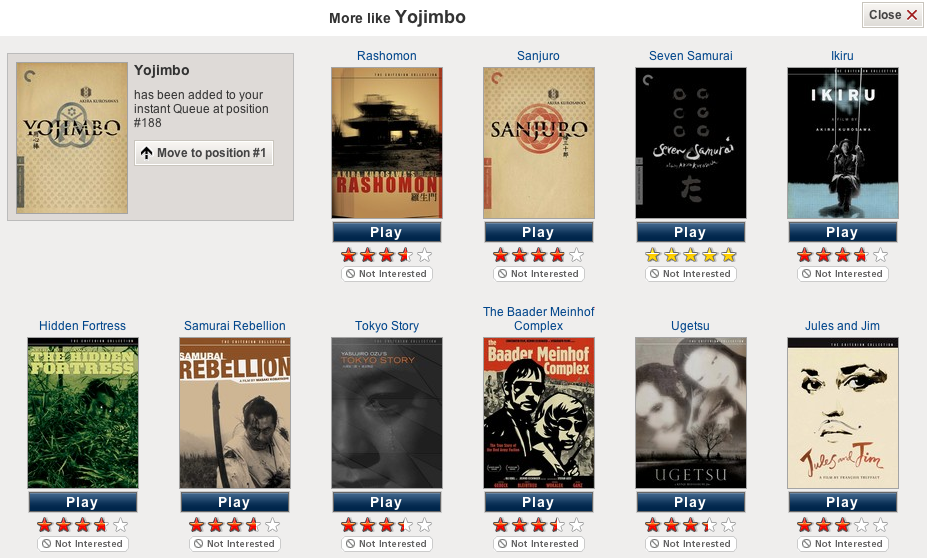
Some time ago I renewed my subscription to Netflix in order to utilize their streaming video service which is offered “free” to all their subscribers. The service is nice but the selection of movies available to Watch Instantly (their term for internet streaming) is a very small subset of the movies that they have on DVD. Because I’m interested to know of any additions to this subset, I subscribe to their RSS feed for New choices to watch instantly. With that subscription I receive notification in my web browser whenever a movie is made available for Instant viewing. This morning there were approximately 20 new movies available which I quickly scrolled through, clicking open a new tab for each that interested me. One of these was Yojimbo by the legendary Japanese director, Akira Kurosawa, who also directed the seminal Seven Samarai. After reading the description, I clicked the “Add to Instant Queue” button to save it for later viewing. Whenever you add a movie to your queue on Netflix they suggest 10 more related movies that they think you might like. This time, they showed me these (click to enlarge the image):

Netflix Choices

My eyes were immediately drawn to one of the movies on the bottom and in the middle, The Beider Meinhof Complex. The name was somewhat familiar so I read the description but it didn’t interest me so I closed the window.

Continue reading “Reverse Baader-Meinhof Syndrome”